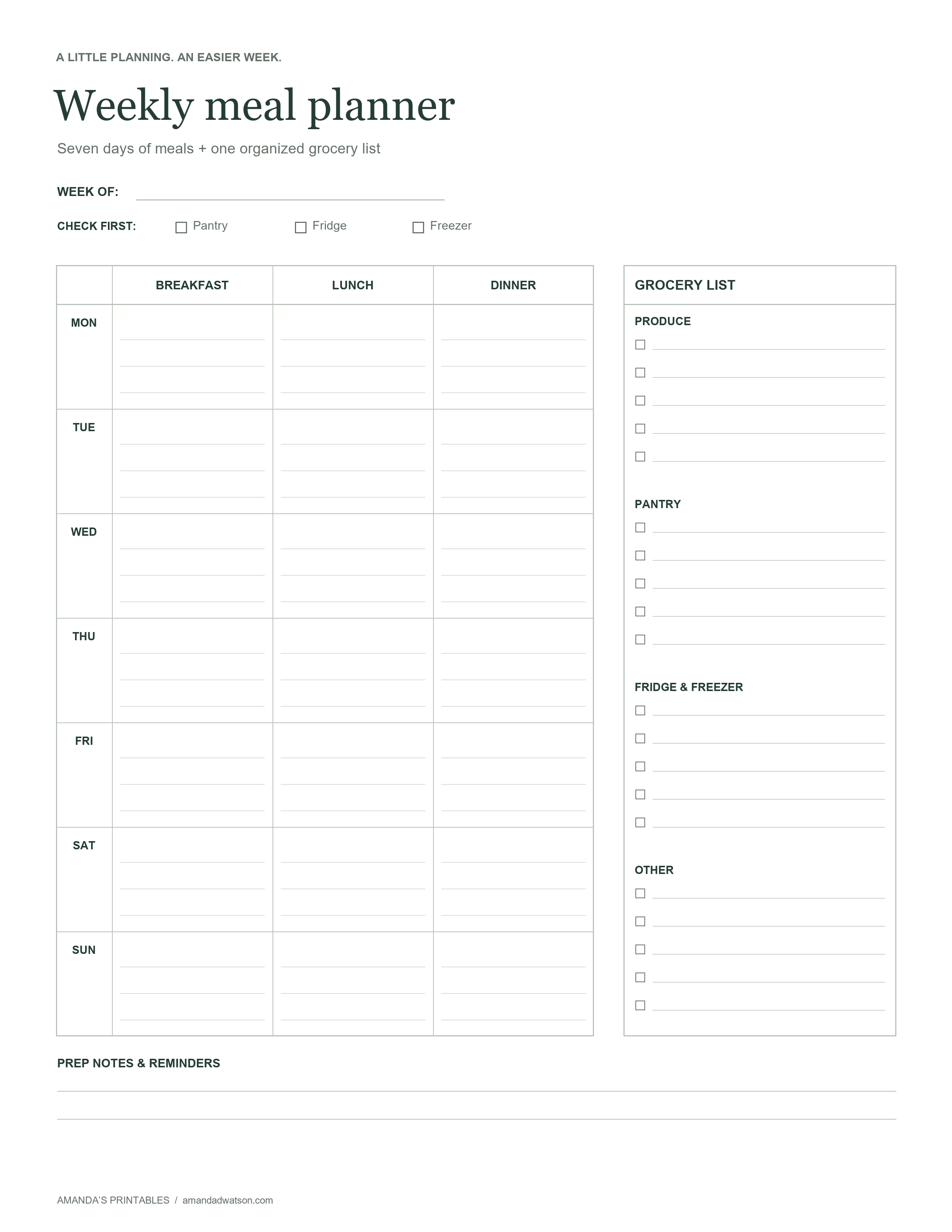
This free weekly meal planner with grocery list keeps your meal ideas and shopping notes together on one page. Write down breakfast, lunch, and dinner for Monday through Sunday, then build your grocery list beside the plan. The layout is undated, so you can use a fresh copy any week of the year.
You do not need to plan every meal from scratch. Start with a few familiar dinners, make room for simple breakfasts, and leave space for a change of plans. The aim is to make the next shop and the next “what’s for dinner?” conversation a little easier.
Your printable weekly meal planner with grocery list
What is included in the template?
- A week-of line: Add the starting date so you can tell one week’s plan from the next.
- A kitchen check: Tick off the pantry, fridge, and freezer as you look through what you already have.
- A seven-day meal grid: Separate columns for breakfast, lunch, and dinner give each meal its own space.
- A categorized grocery list: Group items under Produce, Pantry, Fridge & Freezer, and Other.
- Prep notes and reminders: Keep a short list of jobs, recipe references, or things to remember.
The original image is 2,550 × 3,300 pixels with a white background, dark text, and light writing lines. It has US Letter proportions and is designed for handwritten plans. The page also works in grayscale.
How to plan the week and build your shopping list
1. Check the kitchen before choosing meals
Look through your pantry, fridge, and freezer, and note the ingredients you want to work into the week. If you already have rice, pasta, or a bag of frozen vegetables, use those as a starting point. The three checkboxes at the top are a small reminder to look before adding more to your list.
2. Match meals to your actual schedule
Mark the evenings when you will have less time to cook. Put a familiar, straightforward meal on those days and save a new recipe for a day with more breathing room. You can write “out,” “packed lunch,” or “choose on the day” in a box when that fits your plans.
3. Write short meal names
A few words are enough: “oats and fruit,” “sandwiches,” or “vegetable pasta.” For a recipe you want to revisit, add its name and a cookbook page number in the prep notes. Keeping the grid brief leaves room to cross something out and change it later.
4. Turn the meal plan into a grocery list
Work through the meals one at a time and list the ingredients you still need. Add quantities that suit your household, and combine repeated ingredients into one entry. For example, if two dinners use onions, write one onion entry with the total you need rather than listing it twice.
Then check everyday staples such as milk, bread, or your usual breakfast ingredients. Put household shopping in Other so it does not get mixed into the meal grid.
A simple example of a flexible meal plan
You might plan vegetable pasta for Monday, a rice bowl for Tuesday, and an omelet with toast for Wednesday. Your grocery list would bring the missing vegetables together under Produce, pasta and rice under Pantry, and eggs under Fridge & Freezer.
If the week changes, swap two dinners or cross one out. There is no need to rewrite the entire page. Leave one dinner open if you prefer to decide later, and add a reminder to check what is available before shopping again.
Download and print your meal planner
Use Download image beneath the template to save the original PNG. To print from a document, choose US Letter PDF or A4 PDF and select Download PDF. The website generates the PDF from the same image in your browser; there is no separate workbook or spreadsheet.
Select US Letter paper for an 8.5 × 11-inch sheet, or choose the A4 option for 210 × 297 mm paper. The design keeps its proportions on either size, with a little more white space on A4. Check the print preview and use actual size for the generated PDF. If an edge is clipped, choose fit to page.
Common questions
Can I reuse this meal planner every week?
Yes. It has no printed dates, so you can print a new copy whenever you need one. Keep the original download rather than searching for the template again.
Is the meal planner editable or fillable?
The PNG is an image, and the generated PDF is a flat image document without fillable fields. Print the page and write by hand, or use an annotation app to add your own notes digitally.
Can I share the template?
You may print copies for personal and classroom use. When sharing online, please link to this article so others can get their own copy. Do not resell or redistribute the image or generated PDF files.
For appointments and other tasks alongside your meals, try our free printable weekly planner. Use the two pages together to keep the week’s commitments and meal ideas easy to find.